Let's see the result first! It will look like this |

Or

Or


Hello everyone This is the first tutorial about photoshop we'll see in this fantastic tutorials how to make How to make professional 3D text in Photoshop Cs5 It's easy just need some Concentration because there's a lot of levels there are people have high level in photoshop and there are beginners so as i said just concentricity you'll get a good result, Enjoy!


Gooenglish Completed a short tutorial about how to login into your Facebook account without write your E-mail and make a short facebook address Like this www.facebook.com/gooenglish in place https://www.facebook.com/pages/gooenglish/890****06 this option has a lot of Benefits it makes your facebook link attractive and easy to use like forums other social networks youtube ETC.. just put the link and you'll see how much LIKE aday or friend so let's see how to do it and don't forget to share to your friends if you found it helpful, ENJOY!
 To make a good browsing on facebook you should install a plugin to your browser Whether mozilla firefox/Google chrom this plugin its service About displaying ads on facebook (Disturbing side FB adsense) so in this tutorial we going to know this plugin and how it works!
In this tutorial I used Firefox as the browser so let's know the ADS business in the the pictures below


we knew the ADS busness places so to display/remove it just follow the following steps
Go to google and then write Adblock as the picture below.

If you have Firefox as browser click directly on this link.

in few seconds the Mozilla website will apear and than click on Add to firefox like in the picture below.

And wait until Completing download

a pop up window will apear ask you to install the plugin, click on install Now

and then we need to restart our browser by clicking Restart Now

login your profile on Facebook and check if the adsenses still apear of course you'll find NOthing, The result


It's look better now without the ADS business on your profile, don't forget to share to your friends this tutorial if you found it helpful for you!


PicMonkey is a feature-rich, free online photo editor that works right in your browser; no downloads necessary. Touch-up tools like Teeth Whiten, Blemish Fix

Howdy Guys Facebook TIMELINE users and beginners in this simple tutorial we going to know how to control and change the cover photo on your profile, Enjoy!

Hello everyone in this simple tutorial about Facebook TIMELINE we going to know how to hide the Pages that we Liked before, Enjoy!

Hello Again this is about your policy in Facebook if you wanna hide your infos this simple tutorial about hiding E-mail address on your Profile, Enjoy!

Hello Again in Gooenglish tutorials in this one we going to know how to hide Friends on Facebook TIMELINE, enjoy!

Hi Again TIMELINE users and beginners in this tutorial we going to know how to control and edit Profile's Picture on Facebook TIMELINE, Enjoy!

Hello Everyone here in this simple tutorials we going to know how to control and edit the albums on Facebook TIMELINE, Enjoy!

Howdy every body And timeline begginers and users in this tutorial in this simple tutorials we goin to know how to hide Our wall on favebook, Enjoy!

Hello everybody! today we Accomplished a different kind of tutorials about photo coloring & Effect! in this tutorials you can make a professional High quality effect photo the website gives 40 pro ones so All you need a High quality photo to make a Good picture firstable all you need this website  and then follow the tutorial, Enjoy!
and then follow the tutorial, Enjoy!
Today facebook Was conducted to all the pages new style TIMELINE like profiles previously when you enter your page I guess always you found a message tell you that the change made on facebook pages and then it gives you choice if you wanna get started with facebook TIMELINE ( new style )
on your page, and also you can upload a picture that only
has in her Standards 850×318
to make a beautiful cover pictures in your page and this is a Example for Cover photo:

on your page, and also you can upload a picture that only
has in her Standards 850×318
to make a beautiful cover pictures in your page and this is a Example for Cover photo:
The page's Private management apear in the top and you can hide it if want by buttons ..
and also just above the cover photo you can see all the
Notifications and messages and also who writes in the wall New Likes, Insights, and pages tips!
and the pages Consists Several features the most important are as follows:
-Cover Photo: is the most important because first what the visitors see is the cover photo so you must put a wonderful one.
-Profile's photo: It's important too, use your LOGO or small Square image almost 180 pixel at least.
-Highlight important elements: Images and recordings of admiration and applications in the top you can change the Order of Elements To see what people you care more than others you can view 12 apps Maximum so beware to choose the most important applications first.
-Review your diary: Hover your mouse pointer on some event and click on the star to make it large or the pen to install it in the top or Hide or remove it Completely.
-Manage everything in one place: Tracking your activities on your pages from management reply All the statuts quickly when someone wrote, visite your activities to review Your publications and your activity.
-Respond to messages in particular: the people can connect with you by private messages the notifications apear when someone send a message.

Howdy every Facebook's Lovers in this topic we gonna show you how to know your id on facebook
first we start by profile id and then we know page
no matter if you already used username to your profile or page
we'll show how to know it in 2 cases if you have username or normal adresse
to know your profile id
First you need to login into your account and go to your profile and you will find it in the adresse like highlight one

This is About the profile that only doesn't have username before
now we move to know the profile that used username before

First you need login your facebook account like we show in the first case but in this case we have a different way to know the ID
click on your profile picture

And then Go to the adresse in the top
you'll find numbers like this

The numbers between . and & Those numbers are the ID
Now we move to the pages
How we know facebook pages ID
Almost like the profile
so in the the pages that haven't used username before the ID be in the adresse with your profile adresse
in this case (page hasn't username) the ID aprears in the last of adresse like in the highlight ones

This is about the pages that haven't username before
now gonna know the deffirent case
if we have a page has a username

Go to your control panel click Manage and then click on Edit page

and the ID apears in the page adresse Like this

So now you got the ID of All the cases that you need to know
Done!

Hello everybody here with us in GOOENGLISH we Completed this topic about getting friends on Facebook Gooenglish will give you a BIG SECRET to get a lot of friends from United states and United kingdom and French (If you wanna contact us) in an easy way, actually It's a special idea By Gooenglish ..
Briefly Very simple Process and not complicated! At the beginning of the command Before we get started In anything!
Download the following Emails filles I uploaded it with Hotfile:
-USA Emails (1356 email )
-UK Emails ( 1939 email )
When you open the file you'll get the emails of anyone that you want US email or UK email you know which one you wanna or both letting you to choose ..
Now after we upload the emails files login into your account on facebook and then click on Find friends like in the pic

If you Have Old Facebook Account Or you Lot of friends of course it doesn't apear But you can click on Friend requests > Find Friends Like This

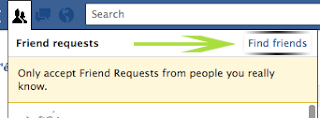
And then the following window will apear we choose Other Tools And Uplad Conctact File And Choose file Like I showed in the following pics ( Step 1 )


And you can Choose Any File that we downloaded before US Emails File Or UK Emails File And click on Upload contacts And wait few seconds  ..
..
..
Now Click on Select All Friends And Add Friends To Send the All invitation ( step 2 )
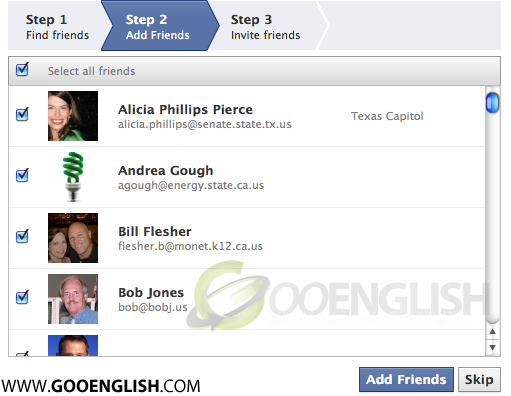
Congrats for the BIG number of Friends
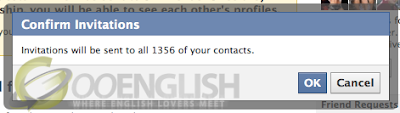
When you clicked on Add Friends you become send to All the Emails that you selected
Finally If All these Invitations Have Confirm you will get 3,295 friend
Enjoy!

http://www.Facebook.com/about/timeline.com And Then Follow The Tutorial, Enjoy!


Recent Comments